
Enhance Photo Quality Online
Upscale images, remove blur and JPEG artifacts, and restore details without watermarks.
About the service
AI photo enhancer and image upscaler
To enhance photo quality online, upload an image, pick a model and download the result without a watermark. The AI upscaler enlarges photos up to 6x and removes noise, blur and JPEG artifacts. Half of the models run on the daily bonus, so you can enhance photos for free.
The result depends on the source and the model: enhancement reduces noise and blur, but cannot reliably recover details that were never captured. Check faces, lettering and fine textures against the original.
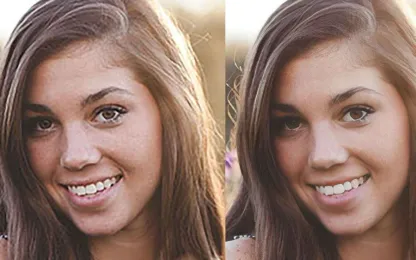
Before and after examples
How to enhance photo quality online
- Sign in and upload one or more images.
- Pick a model for your task (see the guide below) and, where available, the upscale factor.
- Check the price: it is calculated before launch from your files and settings.
- Start processing, compare the result with the original and download the enhanced image.
Which model fits your photo?
| Task | Model |
|---|---|
| Not sure what is wrong with the photo | Pic Refiner v3 — chooses the fixes itself |
| Portrait or selfie with noise and soft focus | Pic Refiner |
| Small photo where faces must stay the same | Hyper Upscale v5 Realism |
| Compressed image from a messenger or social feed | Simple or Hyper Upscale v4 |
| Enlarge 2–4x for print or a large screen | Pic Refiner v2.1 |
| Enlarge 6x | Hyper Upscale v5 Realism or Creative |
| AI art, a small generation or a badly damaged file | Hyper Upscale v5 Creative |
| Many files in one run | Hyper Upscale v4 — up to 50 images |
See how Pic Refiner, Hyper Upscale v4, and Pic Refiner v2.1 handle the same six photos in the photo enhancer comparison.
Realism tries to keep the original look, while Creative generates missing detail and may change faces and small objects. Below is the same image processed by both models.
Hyper Upscale v5 Realism
Hyper Upscale v5 Creative
Models, prices and limits
| Model | Best suited to | Upscale factor | Price per image | Bonus funds | Files per run |
|---|---|---|---|---|---|
| Pic Refiner | Portraits, noise reduction and photo refinement | fixed | $0.06 | yes | up to 20 |
| Pic Refiner v2.1 | Upscaling with adjustable noise reduction | 1x–4x | $0.05 | yes | up to 20 |
| Pic Refiner v3 | Automatic photo analysis and balanced enhancement | automatic | $0.05 | paid only | up to 20 |
| Hyper Upscale v5 Realism | Restoration focused on natural-looking detail | 1x, 2x, 4x, 6x | $0.04–$0.28 | paid only | up to 20 |
| Hyper Upscale v5 Creative | Generating detail for damaged or AI-made images | 1x, 2x, 4x, 6x | $0.04–$0.28 | paid only | up to 20 |
| Hyper Upscale v4 | General restoration and upscaling | fixed | $0.06 | yes | up to 50 |
| Hyper Upscale v3.5 | Low-resolution images with adjustable creativity | fixed | $0.11 | paid only | 1 |
| Simple | General upscaling and compression artifacts | fixed | $0.03 | yes | up to 20 |
Hyper Upscale v5 pricing depends on the factor: 1x — $0.04, 2x — $0.06, 4x — $0.13, 6x — $0.28 per image. v5 scales inputs larger than 1280 × 1280 pixels down before processing, so a 6x result is up to 7,680 pixels on the long side. Models and prices may change; the form always shows current values.
Restore old photos
Old and scanned photos usually combine several problems: grain, soft focus, low resolution and blurry faces. Good choices are:
- Pic Refiner v3 — analyzes each file separately: reduces noise, fixes blur, restores low-quality faces and corrects exposure, contrast and color.
- Hyper Upscale v5 Realism — enlarges a small scan and restores detail while trying to keep faces unchanged.
- Hyper Upscale v5 Creative — for badly damaged photos, if you accept that the AI will redraw some details.
Upscaling does not colorize black-and-white photos and cannot reliably repair large creases, stains or missing fragments — use the AI photo editor with a prompt such as "remove the scratches and colorize the photo". Scan the original at the highest resolution without compression: the more information the source holds, the more accurate the result.
Files and processing
Upload JPG, JPEG, PNG, WebP, AVIF, HEIC or HEIF files, up to approximately 15 MB each. The upload form accepts images whose width plus height is between 512 and 18,000 pixels. The number of files per run depends on the model — see the table above.
Price and free bonus
Pay for results, not a subscription: each run is priced before launch. Pic Refiner, Pic Refiner v2.1, Hyper Upscale v4 and Simple accept bonus funds; the other models require paid funds.
The bonus balance can be restored up to $0.60 once per UTC day. Recent paying users receive it automatically; others claim it on Daily bonus. A run needs no paid funds when the selected model accepts bonuses and the available bonus covers its full cost. See pricing and bonus conditions.
Frequently asked questions
Can I enhance photo quality for free? Yes, after signing in and within the daily bonus. $0.60 covers about 20 photos with Simple, 12 with Pic Refiner v2.1 or 10 with Pic Refiner and Hyper Upscale v4. Hyper Upscale v5, v3.5 and Pic Refiner v3 require paid funds.
How much can I upscale an image? Up to 6x with Hyper Upscale v5 Realism and Creative, up to 4x with Pic Refiner v2.1. The other models use a fixed factor.
Do I need to sign up? To upload files and run processing, yes. Models, examples and price quotes are available without signing in.
Will the result have a watermark? No, including runs paid with bonus funds.
Will the AI change faces? It can. Hyper Upscale v5 Creative and Hyper Upscale v3.5 at high creativity generate detail and may alter facial features. When likeness matters, use Hyper Upscale v5 Realism or Pic Refiner and compare the result with the original.
Will every photo become sharp? No. Heavy motion blur, missing detail and strong compression limit what a model can recover. Try a representative image before processing a batch. AI-generated details should not be treated as evidence of what was in the original scene.
How long are uploads and results stored? 3 days, or 30 days if your paid balance is at least $1. Files are then deleted automatically and permanently. See the privacy policy.
What's new
- Pic Refiner 2.1 handles lighting noticeably better: light looks more natural and dimensional, while shadows, highlights, and reflections are more realistic.
- The rendering of skin, hair, fabric, foliage, and other complex materials has been improved.
- The model preserves the composition and details of the source image more accurately, producing a more cohesive and expressive result.
- We nearly halved the cost of enhancing image quality with Hyper Upscale v4: from $0.11 to $0.06.
- Cleaner old scans: automatically removes dust/scratches; remnants can be quickly "healed" with the brush — less manual retouching.
- More natural faces: less "plastic" look; the algorithm auto-adjusts smoothing based on face size.
- Sharpening and noise handled more carefully: more fine details with fewer halos and "jaggies"; previews are closer to the final result.
- Higher-quality upscaling: small details are plausibly redrawn for tiny/soft JPEGs and frames from messengers.
- On "heavy" shots (noise, compression) — fewer blocking/banding artifacts; fabric and skin textures are better preserved.
- Smarter auto settings: more accurate scene recognition and targeted processing — fewer misses in batch processing.
- The new version of the PicRefiner algorithm enhances image quality by reducing noise and improving contrast, color range, and sharpness.
What's new:
- Improved detail.
- Universal. From photorealism to anime.
- Added setting - creativity.
The PicRefiner algorithm has been added. A distinctive feature is the automatic adjustment of quality enhancement settings for a specific image.